The Equipment Lookup tool gives you access to the same CEC equipment database that professional system designers use — over 20,000 certified solar panels, inverters, and batteries. You can look up specs, compare products side by side, and check whether your chosen equipment is compatible before you buy.
This guide covers all three modes: Lookup, Compare, and Match.
Lookup Mode
Lookup is the default mode. You search for a specific piece of equipment and see its full specification sheet.
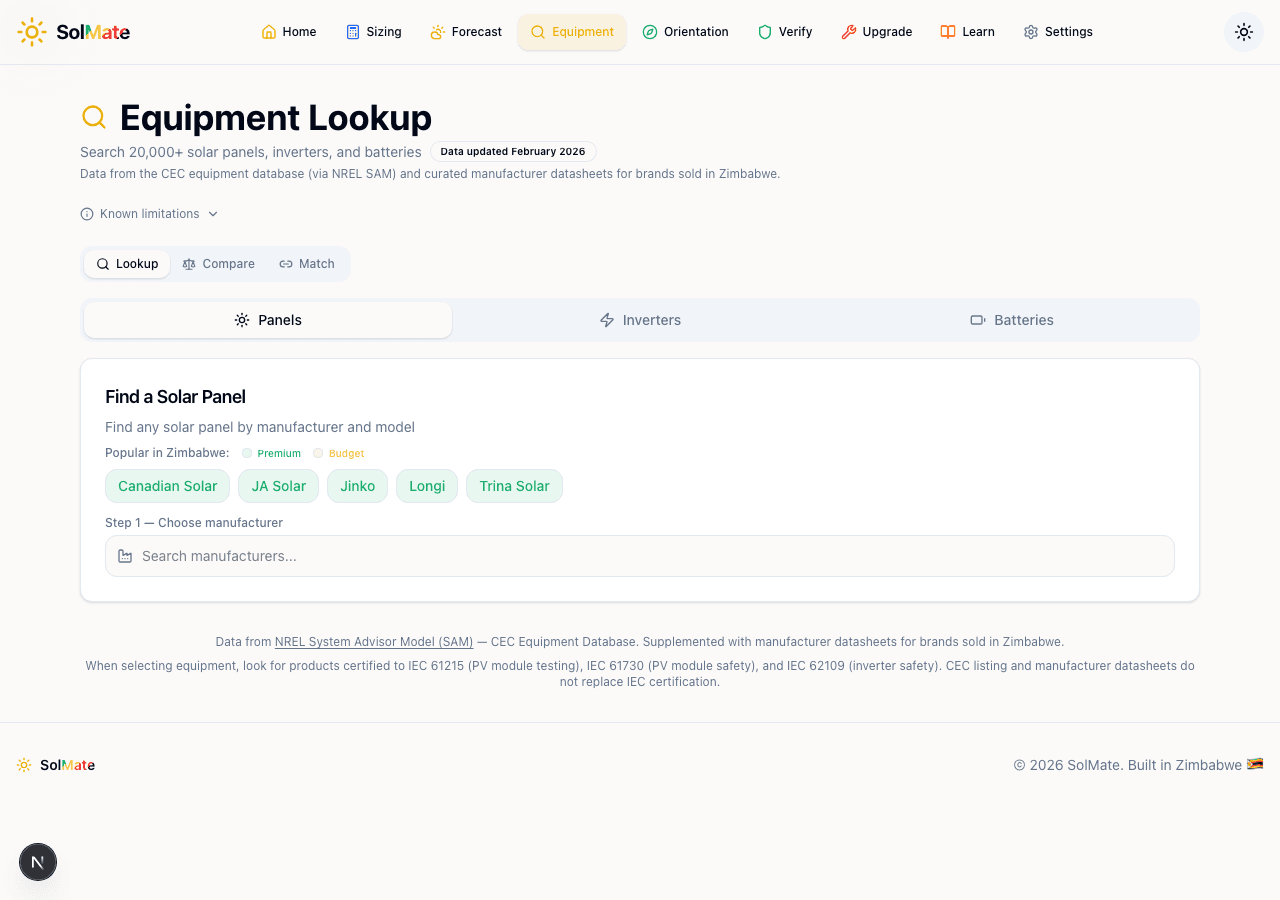 The equipment lookup interface showing search, popular brands, and equipment type tabs
Choosing Equipment Type
At the top, switch between Panels, Inverters, and Batteries. Each type has its own search and spec card layout.
Searching for Equipment
The search works in two steps:
- Choose a manufacturer — type in the search box or click one of the "Popular in Zimbabwe" quick-select buttons (Canadian Solar, JA Solar, Jinko, Longi, Trina Solar)
- Choose a model — after selecting a manufacturer, a second search box appears with all their available models
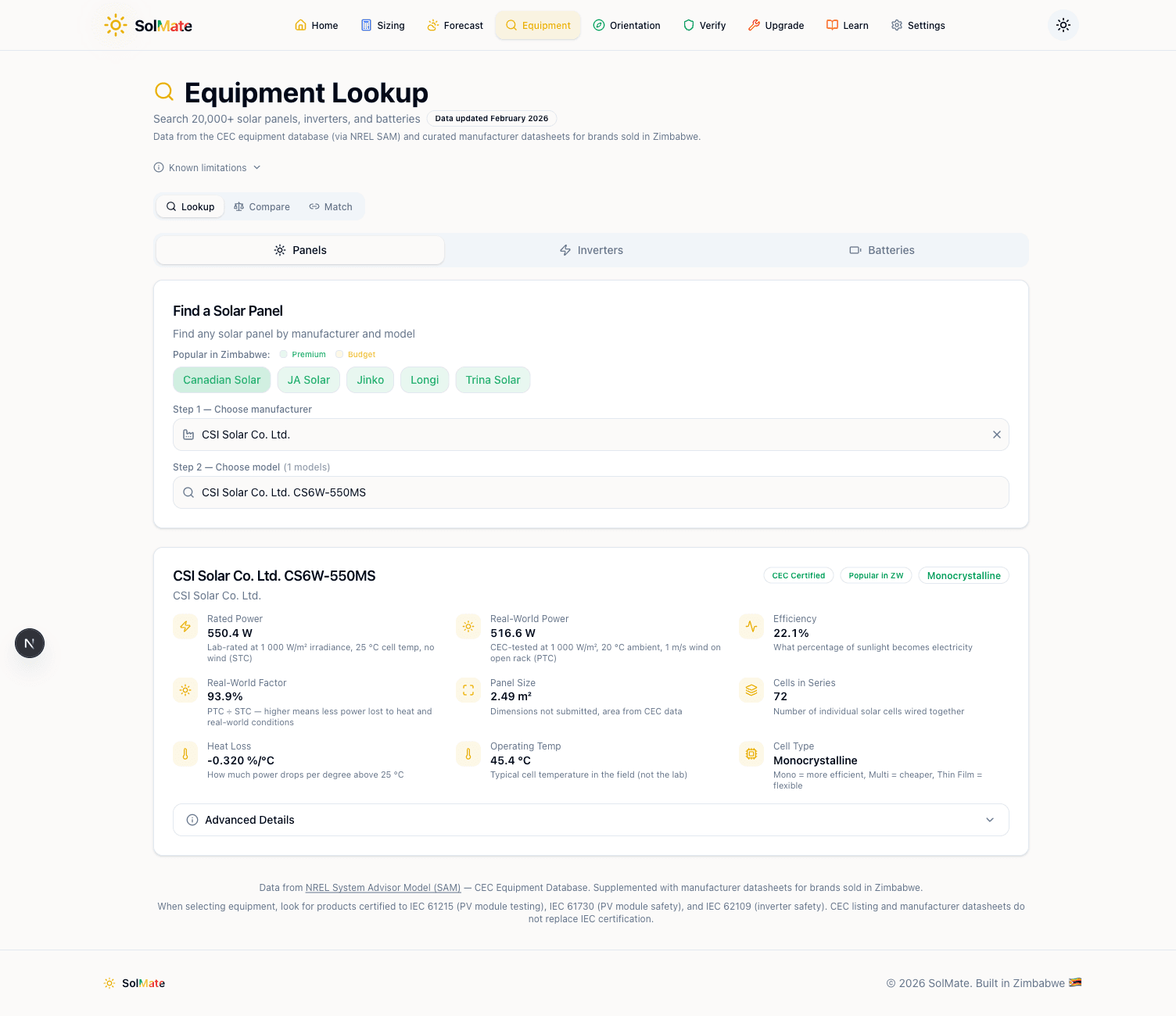 A Canadian Solar panel spec card showing detailed specifications
Reading the Spec Card
Once you select a model, you get a detailed spec card. Here's what each field means for panels:
| Spec | What It Means |
|---|---|
| Rated Power | The panel's output under perfect lab conditions (STC) |
| Real-World Power | Adjusted for temperature, dust, and mismatch losses — what you'll actually get |
| Efficiency | How much sunlight the panel converts to electricity (higher is better) |
| Real-World Factor | The ratio between real-world and rated output (typically 90–95%) |
| Panel Size | Physical area in square metres — important for roof space planning |
| Cells in Series | Affects voltage — needed for inverter compatibility |
| Heat Loss | How much efficiency drops per degree above 25°C (lower is better) |
| Operating Temp | The panel's typical operating temperature |
| Cell Type | Monocrystalline (premium) or Polycrystalline (budget) |
Look for the badges at the top: CEC Certified confirms the panel is in the official database, Popular in ZW means it's commonly available in Zimbabwe, and the cell type badge tells you the technology tier.
Don't fixate on rated power alone. Two 550W panels can have very different real-world output. The Real-World Factor tells you which one actually delivers more power on your roof.
Inverter Specs
When looking up inverters, the spec card shows:
- AC power rating (kW) — the continuous output
- Efficiency — how much DC input it converts to AC output
- Hybrid status — whether it supports battery connection
- Operating voltage range — the DC input window (critical for panel compatibility)
Battery Specs
For batteries:
- Capacity (kWh) — usable energy storage
- Round-trip efficiency — how much energy you get back vs. what you put in
- Chemistry type — LiFePO4 (lithium iron phosphate) is the standard for solar
- Power rating — maximum charge/discharge rate
Compare Mode
Compare mode puts two pieces of equipment side by side so you can see exactly where they differ.
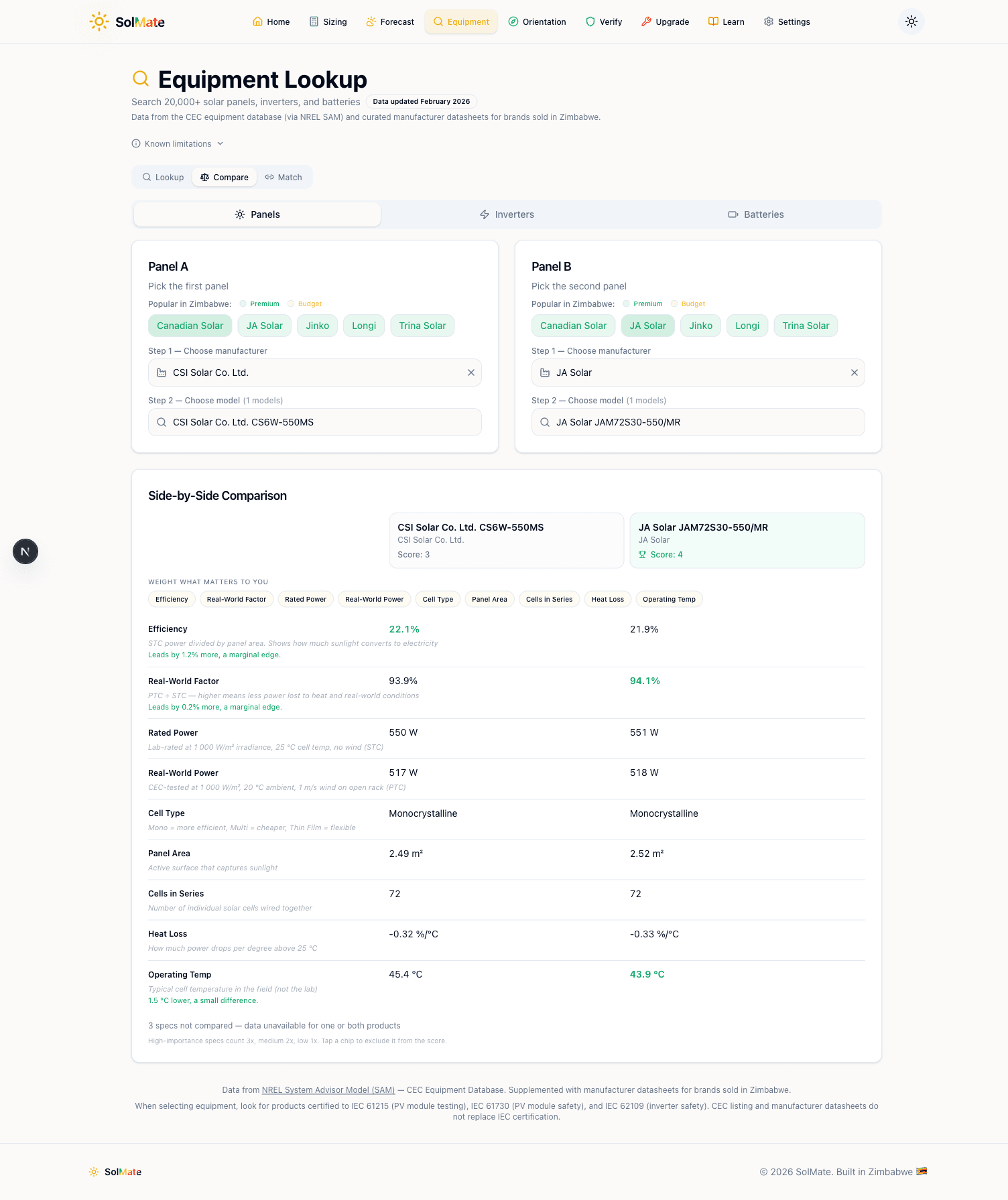 Side-by-side comparison of two panels with specs and score
How to Compare
- Switch to Compare mode using the toggle at the top
- Select Equipment A (manufacturer + model)
- Select Equipment B (manufacturer + model)
- The comparison table appears automatically
Each spec row shows both values with the better one highlighted in green. A running score at the top counts how many specs each product wins.
Weight What Matters
Use the filter chips above the comparison to prioritise what matters to you. If you care most about efficiency, enable that filter and the ranking adjusts accordingly. This prevents a panel from "winning" on specs that don't matter for your situation.
Comparing different equipment types doesn't work — you can only compare panels with panels, inverters with inverters, and batteries with batteries. The specs are too different across types for a meaningful comparison.
Match Mode
Match mode is the most powerful feature. It checks whether your chosen components are compatible with each other — the same kind of check a professional system designer would do.
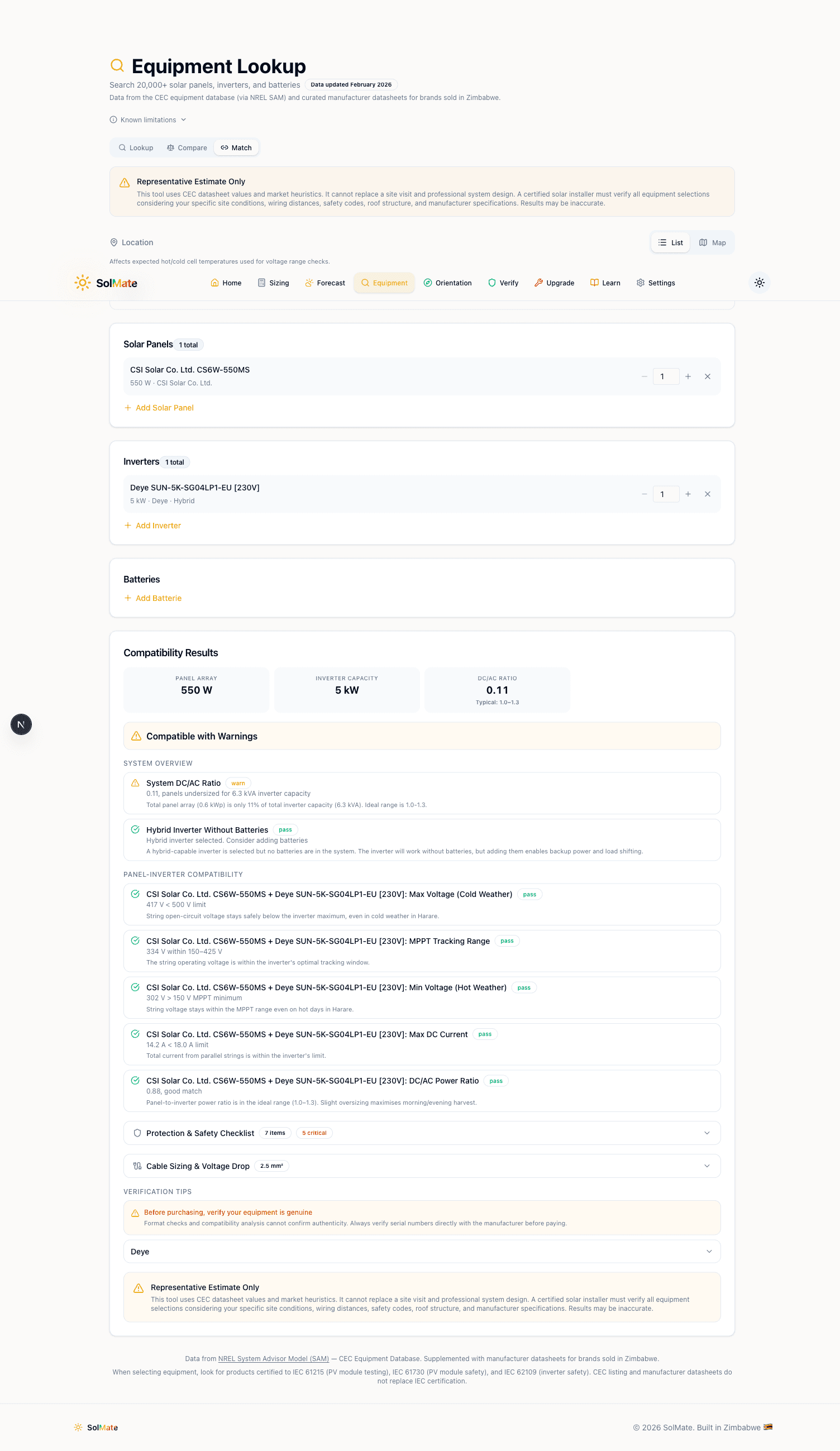 Match mode showing compatibility results with voltage checks and safety checklist
How to Use Match Mode
- Switch to Match mode
- Add your panels — select manufacturer, model, and quantity
- Add your inverter — select the specific model
- Add your batteries (optional) — select model and quantity
- Results appear automatically
Reading Compatibility Results
The results card shows an overall verdict:
- Compatible (green) — everything checks out
- Compatible with Warnings (yellow) — it works but there are things to watch
- Issues Found (red) — there's a compatibility problem that needs to be resolved
Below the verdict, individual checks are listed:
| Check | What It Validates |
|---|---|
| Max Voltage (Cold Weather) | Panel voltage at your location's coldest temperature won't exceed the inverter's maximum |
| MPPT Tracking Range | Panel operating voltage falls within the inverter's MPPT window |
| Min Voltage (Hot Weather) | Panel voltage at your location's hottest temperature stays above the inverter's minimum |
| Max DC Current | Panel string current doesn't exceed the inverter's input limit |
| DC/AC Power Ratio | The ratio between total panel wattage and inverter capacity (ideally 1.0–1.3) |
If any check fails, a How to Fix It box explains what to change — typically adding or removing panels from a string, or choosing a different inverter.
System Overview
At the top of the results, a summary shows:
- Panel Array — total DC wattage
- Inverter Capacity — AC output rating
- Battery Storage — total usable kWh (if batteries added)
- DC/AC Ratio — should be between 1.0 and 1.3 for most systems
A DC/AC ratio below 1.0 means your panels are undersized for the inverter — you're wasting inverter capacity. Above 1.3 means you're oversizing panels, which can work but wastes energy during peak hours when the inverter clips output.
Protection and Safety Checklist
Below the compatibility checks, a Protection & Safety Checklist lists the electrical protection components your system needs:
- DC isolator switches
- AC circuit breakers
- Surge protection devices
- Earth leakage protection
- Battery disconnects
- System monitoring
Each item is rated as critical or recommended. Share this list with your installer — it's a good cross-reference to make sure nothing is missed.
Cable Sizing
The Cable Sizing section recommends wire gauges for your DC and AC cable runs based on the system's current and voltage. This prevents voltage drop and overheating — two common problems in poorly installed systems.
Practical Workflow
Here's how to use the Equipment Lookup tool effectively:
- Start with the sizing calculator — get your recommended system specs (inverter kVA, battery kWh, panel count)
- Look up specific models — search for the brands your installer quotes
- Compare alternatives — put their quote against a competing brand to see if you're getting fair value
- Run a Match check — enter the exact combination your installer proposes and verify compatibility
- Share the results — screenshot the compatibility report and discuss any warnings with your installer
The "Popular in Zimbabwe" buttons highlight brands that are commonly available locally. Starting with these means you're more likely to find local stock, spare parts, and installers who know the equipment.
Equipment Lookup
Browse and compare certified solar equipment.